Work report configuration
Defines one work report.
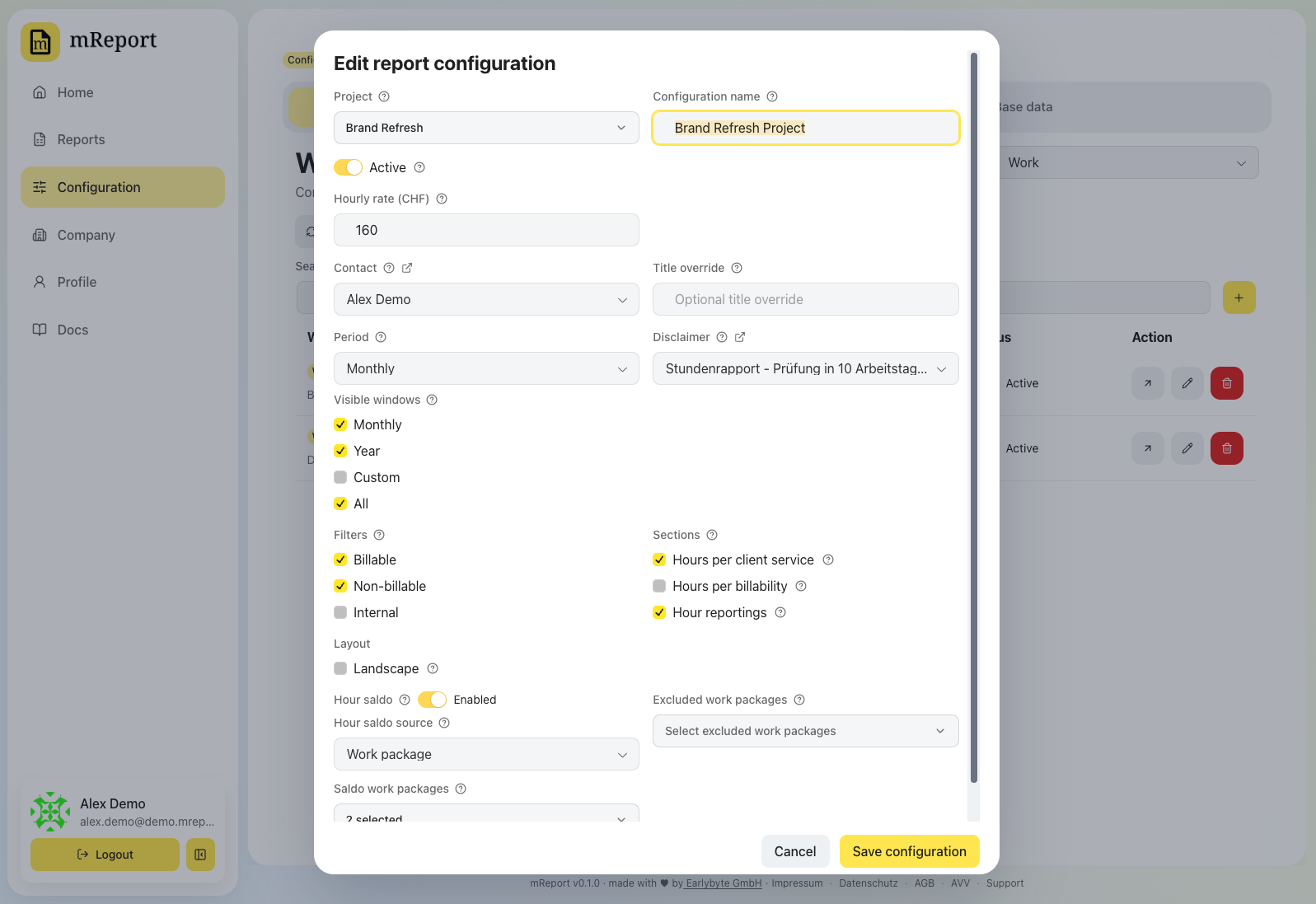
| Field | Effect |
|---|---|
| Name | Shown in the report picker and on the PDF. Leave it empty to keep using the bexio project's name — the project is shown as the field's placeholder, and a renamed project carries through |
| Project | The bexio project the report covers |
| Hourly rate | Drives the CHF view — without it the report has hours only |
| Budget / estimate | The reference line in the hours chart. Kept in step with the bexio work-package estimate on every sync, so lowering it in bexio lowers it here |
| Hour saldo | Off means the report has no budget: the Hour budget card and the PDF's Stundenbudget section are absent, rather than showing a budget of zero. On, the source says where the agreed hours come from — summed from the bexio estimates of selected work packages, or a number entered by hand |
| Work package filter | Restricts the report to selected packages |
| Client service filter | Restricts it to selected client services |
| Period | The period type the dashboard opens on for this report |
| Visible windows | Which period types the dashboard offers: month, year, a custom range, all to date. Unticking one removes it from the choice without changing any stored data |
| Contact | The contact printed in the sender block |
| Disclaimer | A disclaimer for the PDF |
| PDF language | The language this report's PDF is written in. Workspace default follows the PDF layout setting; pick a language to pin this one report for a reader who does not share it |
Sections
Which parts of the report are shown — on the dashboard and in the PDF alike.
| Section | Shows |
|---|---|
| Hours per client service | One row per client service, indented under its billability group — plus the client-service ring of the donut and one trend line per service |
| Hours per billability | The same hours grouped as billable, non-billable and internal, each group with its subtotal, plus the outer ring of the donut. With client services switched off, the trend charts one line per group instead. Follows the classifications this report includes |
| Hour reportings | The individual bexio time entries: the Reportings section of the dashboard, and the list at the end of the PDF |
All three are on by default. With both hours sections on you get one nested table; with one, a flat list of that grouping alone.
Time per entry
With Hour reportings on, Time per entry sets what each listed entry shows as its time — in the dashboard list and in the PDF alike:
| Option | Each entry shows |
|---|---|
| Duration (default) | The booked hours, e.g. 7.00 h |
| From–to | The start and end time, e.g. 08:00–15:00 |
| From–to and duration | Both, one under the other |
A from–to time exists only for entries booked in bexio with a start and an end time. An entry booked as a bare duration shows its hours in every option, so no row is left empty. Times appear for entries after the next timesheet sync.
Times starting at 00:00
bexio's newer time-tracking screen stores an entry booked with only a duration as a range
starting at midnight — seven hours become 00:00–07:00 — and nothing tells it apart from
work that really began at midnight. So by default an entry starting at 00:00 shows only
its duration.
Switch on Show times starting at 00:00 if your people do start work at midnight. Their
ranges then appear — and so do the duration-only entries, as 00:00–07:00. The switch is
offered when Time per entry shows a from–to time, and takes effect at once, without a
new sync.
Periods
A configuration does not pin the report to one window. Period sets the one the dashboard opens on, and Visible windows sets which of month, year, custom range and all to date the picker offers — the reader chooses among those in the report, so one configuration serves every window you leave ticked. See work report → periods.