Project report
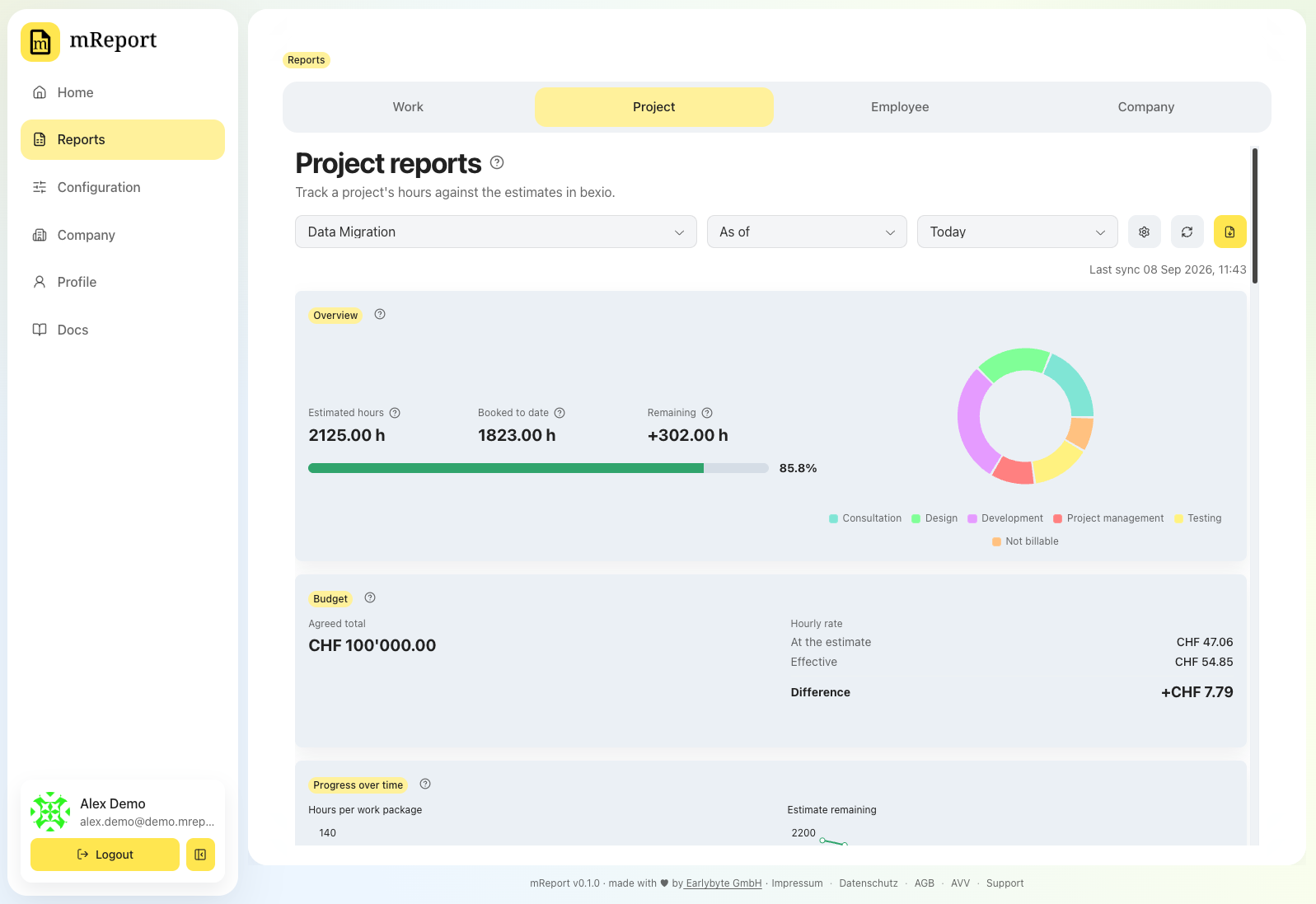
Answers where does this project stand against what was estimated for it — hours booked against the work-package estimates in bexio, and, when you track one, against the budget the project was sold at.
 It is the report to send a client mid-project, and the one to open when someone asks
whether a project is still on track.
It is the report to send a client mid-project, and the one to open when someone asks
whether a project is still on track.
The two ways to read it
Two dropdowns: the first says what you are asking, the second when.
As of a date
Today, the end of last month / quarter / year, or a date you pick. The report shows the project as it stood then: the hours booked up to that date, measured against the whole project's estimate, with the tables and both charts ending there.
Stepping back through the dates is how you watch a project evolve.
A period
This or last month / quarter / year, or a range you pick. The report still shows everything booked up to the end of that period — the estimate belongs to the whole project, so comparing one quarter against it would say nothing — but the period itself is highlighted:
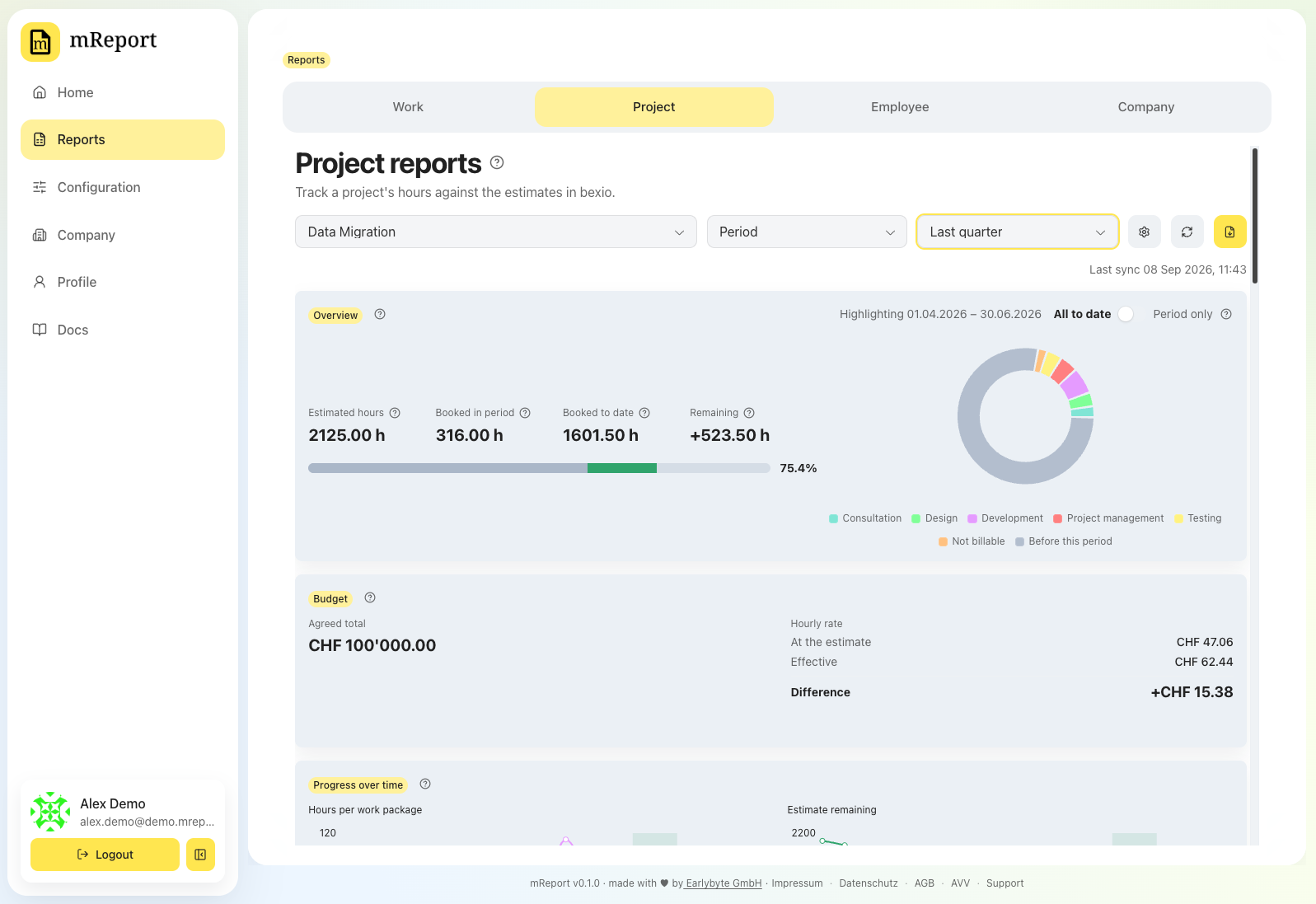 - the progress bar splits into what was booked before the period (grey) and inside
it (colour), against the same estimate;
- the overview adds In this period;
- the work-package and employee tables gain a Booked in period column beside Booked
to date — both are booked hours, and the second includes the first — and each row's bar
follows the same rule: grey up to the period, the period's client services in colour
after it;
- the donut shows the period's client services, with one grey slice for everything booked
before it, so the ring still adds up to the total above;
- both monthly charts mark the period's months — see below;
- the entry list narrows to them.
- the progress bar splits into what was booked before the period (grey) and inside
it (colour), against the same estimate;
- the overview adds In this period;
- the work-package and employee tables gain a Booked in period column beside Booked
to date — both are booked hours, and the second includes the first — and each row's bar
follows the same rule: grey up to the period, the period's client services in colour
after it;
- the donut shows the period's client services, with one grey slice for everything booked
before it, so the ring still adds up to the total above;
- both monthly charts mark the period's months — see below;
- the entry list narrows to them.
So a quarterly report to a client answers both questions on one page: what we did in the quarter, and where that leaves the project.
The overview card states what you are looking at, at the top — "Highlighting 01.04.2026 – 30.06.2026". It names the period only: the period always ends on the date the report is measured to, so naming both would say that date twice. The columns carry the rest — Booked in period beside Booked to date.
All to date, or the period only
Beside that line, a switch decides whether the bars and the donut include what came before the period. On a project that has been running for years the grey fills most of the ring and leaves the period's own services as slivers; turning it off drops the grey everywhere and rescales what is left, so the period's work fills the picture.
It changes only how things are drawn. The figures keep both numbers either way, in labelled columns, so nothing you are comparing changes meaning underneath you — and the two monthly charts always cover the whole project, because a quarter of a monthly chart is three points and no shape.
Which dates are offered
The date fields never accept a day before the project's first booked hour, so you cannot bound a report to a time when the project did not yet exist.
Overview
Estimated hours, booked, remaining, and the percentage consumed — in that order everywhere they appear, so the row reads as a sentence: planned this, used that, this is left. Past 100% the progress bar draws the overrun as its own segment, so a project at 130% cannot look like one at 100%.
Beside it, the split of those hours across client services.
If nobody maintains estimates on the project's work packages in bexio, the report says so and shows hours only — no progress bar, no percentage. That is a different statement from "estimated at zero", and the report keeps them apart.
Budget
Optional, and off by default. Switch it on in the report configuration and say how the project is sold:
 - a fixed price for the whole scope, or
- time and materials at an hourly rate, with an optional cost ceiling.
- a fixed price for the whole scope, or
- time and materials at an hourly rate, with an optional cost ceiling.
The card then shows the same three reckonings for either arrangement: the hourly rate the project was priced at against the rate it is actually realising, the agreed total with any change orders that raised it, and — with a cost ceiling — what is left of it.
Change orders are additions agreed after the original order. They raise the fixed price, or the ceiling on a time-and-materials project, and the original amount stays visible beside the new total.
Progress over time
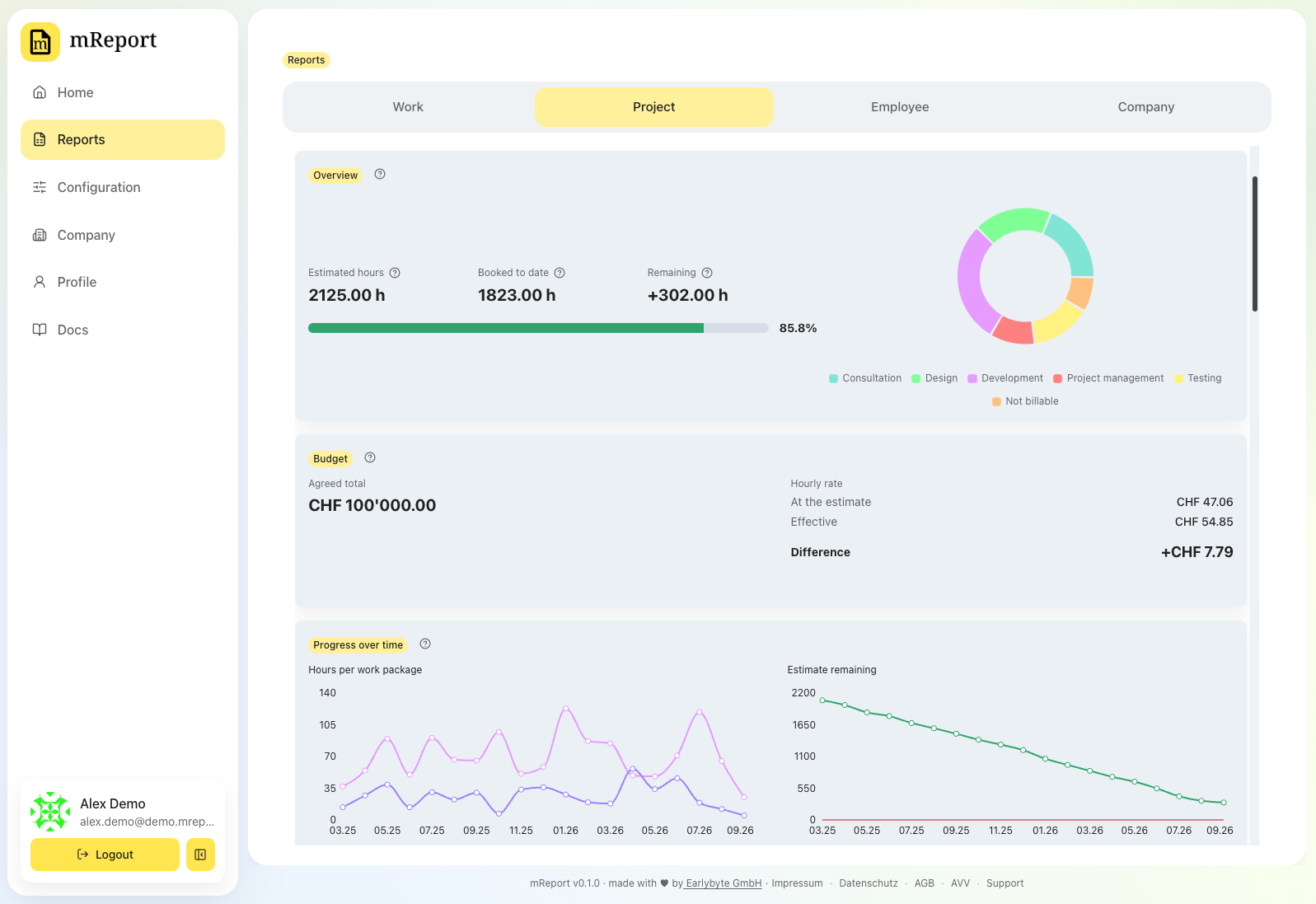
Two charts side by side, always covering the project's whole life — from its first booking onwards — whatever date or period you selected:
- Hours per work package — where the time went, month by month.
- Estimate remaining — how much of the estimate was still unspent at each month end. The line crosses zero at the month the project went over.
On an archived project the shortcuts are anchored on the project instead of on today, because every today-relative one resolves past its end: all the as-of shortcuts would return the same report and all the period ones nothing booked. You get Project end, One month before project end and One year before project end under As of, and Final month and Final year under Period — offsets from the end, so none of them can be read against today's calendar. A shortcut landing outside the project's own dates is not offered at all, so a project that ran four months is not asked about the year before it ended. An archived project also opens on Project end rather than Today.
What moves when you change the selection is the green mark: a band over a period, a line for a single month or for an as-of date. The axis stays put, so two periods can be compared on one curve rather than each selection redrawing the chart as its own shape. An as-of report on today shows no mark — there is nothing to point at but the last month.
Months with no hours are drawn as they are. A chart that skipped them would draw a straight line across the gap and claim work continued through it.
Where the axis ends depends on the project. While the project is open in bexio the charts run to today, so a stretch with nothing booked is visible as the flat tail it is — on an open project that means stalled, and it is worth seeing. Once bexio has archived the project, the charts stop one month after its last booking instead: the months since are not part of the project's life but the gap between its end and today, and on a project that finished two years ago that gap took up most of the chart. The extra empty month is kept so the lines close down to zero rather than stopping mid-air.
There is no planned-versus-actual line: bexio's work packages carry an estimate and no dates, so any "ideal" line would be invented.
Work packages and employees
One row per work package with its estimate, hours booked, hours remaining and percentage consumed, and one row per person with their hours and share of the project. Time booked without a work package is its own row, Unassigned — never hidden and never folded into another package.
Both sections can be switched off in the report configuration.
Hour reportings
The individual bexio entries the figures are built from, with search and filters by work package, client service and person. Useful when a number looks wrong and you want to see what produced it.
The list covers the report's client services up to the date it is measured to, and narrows to the highlighted period when one is selected — it is what you consult to see what happened during it. Click a row to read a long entry text in full.
Export as PDF
A client-facing document, laid out like the work report's and in the same order as the dashboard: your sender block and the project's bexio contact as recipient, then the standing against the estimate as one row of figures with the same progress bar, the split by client service as a donut with its hours named beside it, the budget with its own bar where there is something to consume, both monthly charts side by side, and the work-package and employee rows.
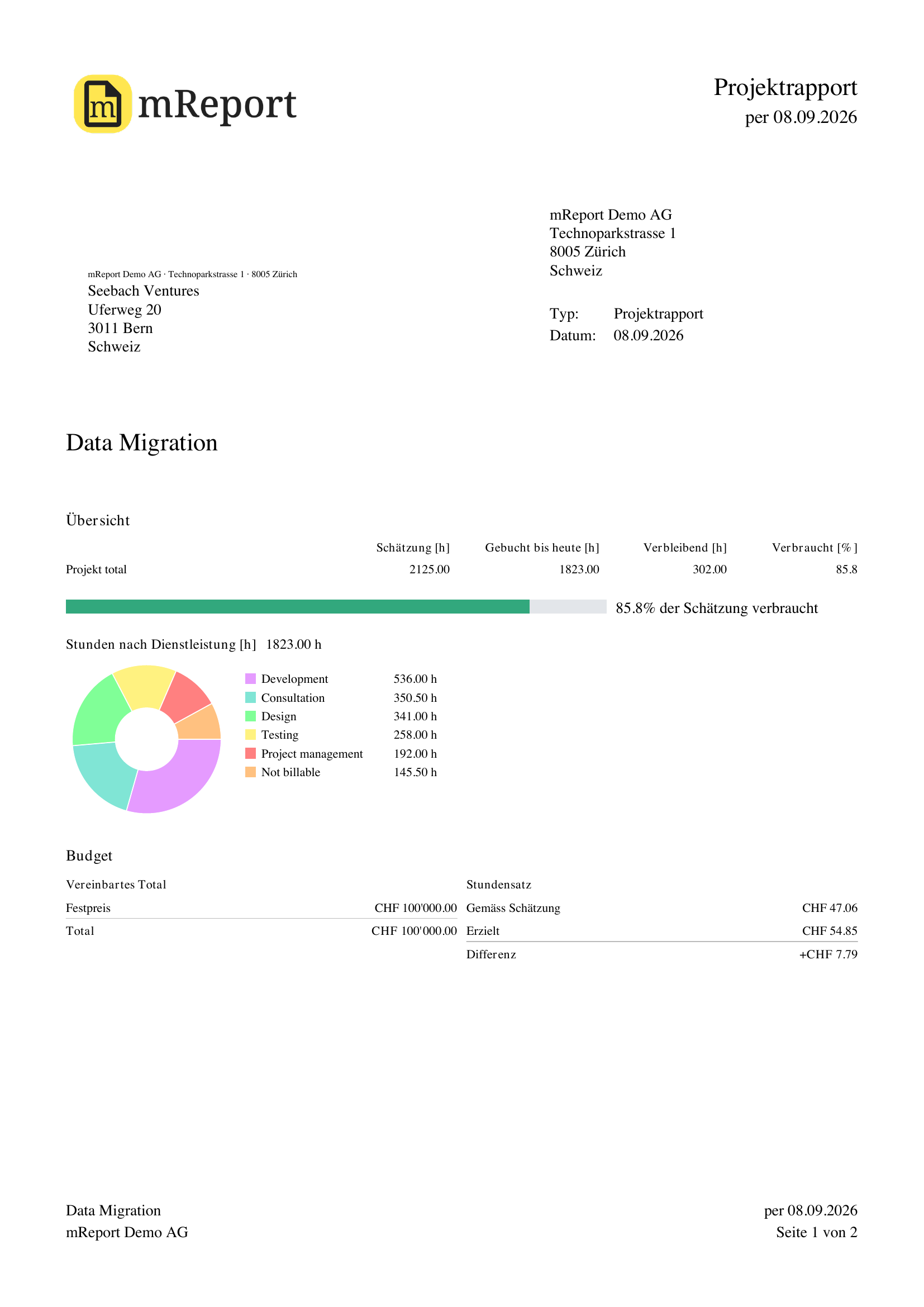 Those rows carry the dashboard's bars — a grey estimate lane over the coloured run of client
services — drawn against one shared scale, so a row's length can be read against the row
above it. The header names the date the figures are measured to, and the period highlighted
inside it; a period view adds an Im Zeitraum column to both sets of rows.
Those rows carry the dashboard's bars — a grey estimate lane over the coloured run of client
services — drawn against one shared scale, so a row's length can be read against the row
above it. The header names the date the figures are measured to, and the period highlighted
inside it; a period view adds an Im Zeitraum column to both sets of rows.
The PDF does not append the individual entries — a project report covers the project's whole life, and that list belongs on screen where it can be filtered.
Look before you spend an export
The eye beside the export button opens the same report as a preview: the real document at the real layout, with an outlined box where your logo goes. It opens in a window rather than downloading, and it does not count against your plan's monthly PDF allowance — so checking that the period, the filters and the sections are right costs nothing. The export carries your logo.
Changing what you see
| You want to | Go to |
|---|---|
| Change the project, budget, sections or default view | Project report configuration |
| Change which client services count | Project report configuration |
| Change the estimates themselves | bexio — the estimate on each work package |
| Change the chart colors | Chart colors |
| Change a client service's color slot or billable flag | Client services |
| Change the contact printed on the PDF | Contacts |
| Add a disclaimer to the export | Disclaimers |