PDF layout
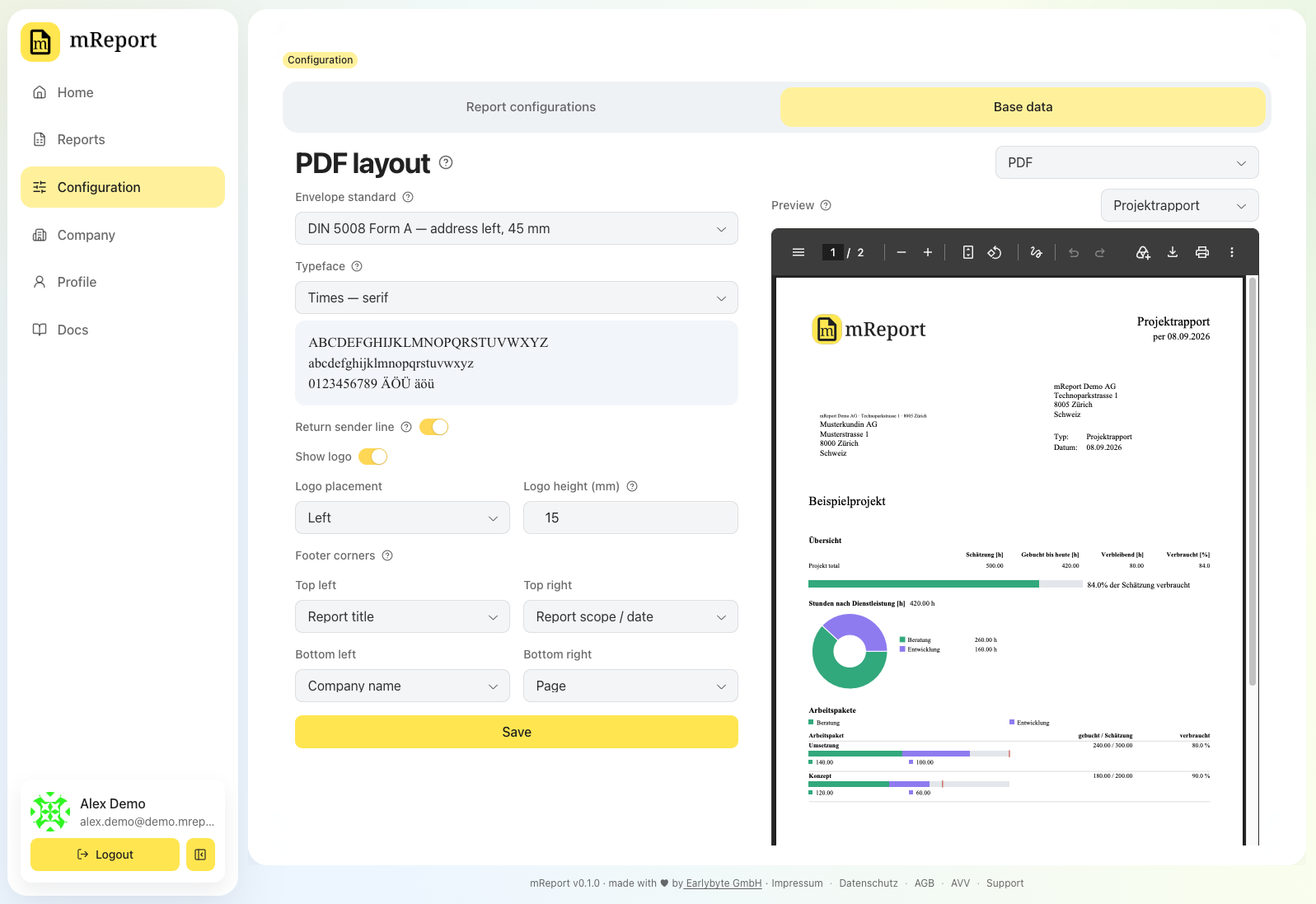
The layout every report PDF is printed with — one per workspace, like your contacts and disclaimers: the language it is written in, the typeface, the logo, where the recipient's address lands and what each footer corner says.
 | Setting | Effect |
|---|---|
| Report language | The language every report PDF is written in — German, French or English. Each report preset can override it for a client who reads another language |
| Envelope standard | Where the recipient's address is printed, so it lands in the window of the envelope you send. SN 010130 puts it on the right, as Swiss C5/C6 window envelopes expect; DIN 5008 Form A and Form B put it on the left, Form B five millimetres lower because it assumes a taller letterhead |
| Typeface | The font every report PDF is set in. Seven, each answering a different question: Times, EB Garamond and Source Serif with serifs, Helvetica, Source Sans, Lato and Noto Sans without. A specimen under the dropdown shows the alphabet and digits at readable size |
| Return sender line | The one-line sender printed inside the window above the address, so the post can return an unopened letter. Taken from your company address |
| Show logo | Off prints the reports without it |
| Logo placement | Which side of the header the logo takes. The report's title takes the other |
| Logo height | In millimetres, 5 to 40; the width follows your logo's own proportions, up to half the page width. Past about 30 mm the header grows tall enough to push the address field out of the envelope window — the preview shows it happening |
| Footer corners | What each of the four corners prints: report type, company name, report title, report scope/date, page, today's date — or nothing |
| Setting | Effect |
|---|---|
| Report language | The language every report PDF is written in — German, French or English. Each report preset can override it for a client who reads another language |
| Envelope standard | Where the recipient's address is printed, so it lands in the window of the envelope you send. SN 010130 puts it on the right, as Swiss C5/C6 window envelopes expect; DIN 5008 Form A and Form B put it on the left, Form B five millimetres lower because it assumes a taller letterhead |
| Typeface | The font every report PDF is set in. Seven, each answering a different question: Times, EB Garamond and Source Serif with serifs, Helvetica, Source Sans, Lato and Noto Sans without. A specimen under the dropdown shows the alphabet and digits at readable size |
| Return sender line | The one-line sender printed inside the window above the address, so the post can return an unopened letter. Taken from your company address |
| Show logo | Off prints the reports without it |
| Logo placement | Which side of the header the logo takes. The report's title takes the other |
| Logo height | In millimetres, 5 to 40; the width follows your logo's own proportions, up to half the page width. Past about 30 mm the header grows tall enough to push the address field out of the envelope window — the preview shows it happening |
| Footer corners | What each of the four corners prints: report type, company name, report title, report scope/date, page, today's date — or nothing |
The language a report is written in
A report PDF is a document you send to someone, so its language follows the reader, not whoever clicked Export. That is why it is set here and per report, and not in your profile: a French-speaking client gets a French Leistungsrapport even when your whole team works in German, and the same report exported by a colleague comes out identical.
This setting is the workspace's default. Each report preset — work, project and company — carries a PDF language of its own, set to Workspace default until you change it, so a single client who reads French does not turn the rest of your reports French. An employee report has no preset, so its language sits on the employee's dataset in employee time, beside their disclaimer and postal address; it is effective-dated with the rest of that dataset, so a report for an earlier year prints in the language that applied then.
Three things it does not change. It is not the language of mReport's own interface. It does not rename your projects or work packages — those keep the names your workspace gave them. Client services are the exception: mReport keeps translations of those, so a French report names them in French where a translation exists. And it does not change a single figure: the same report in three languages is the same report.
The preview beside the settings is drawn in the language you pick, so you can read what a French or English report actually looks like before saving.
The typefaces, and why these
Seven, not seventy. Each one is a different answer rather than another of the same:
| Character | |
|---|---|
| Times | The PDF standard serif. Narrow, so tables fit |
| EB Garamond | An old-style serif — a formal, printed-letter feel |
| Source Serif | A contemporary serif that stays readable at table sizes |
| Helvetica | The PDF standard sans |
| Source Sans | A neutral sans, the plainest of the three |
| Lato | A warmer, more humanist sans |
| Noto Sans | The widest character coverage — pick it if client names use Greek, Cyrillic or other non-Latin scripts |
Times and Helvetica are PDF standard fonts: nothing is embedded and every reader already has them or a metric-compatible substitute. The other five are embedded in the file, and all five are under the SIL Open Font License 1.1, which permits exactly that. Their licence files ship with mReport.
Two things worth knowing before you switch. A wider face makes a table's column headings wrap where a narrower one did not — the preview shows it happening. And the specimen under the dropdown is drawn with the same font files the PDF embeds, so the letters on screen are the letters that get printed.
Where the sender ends up
The envelope standard decides that too, because the two standards put the address on different sides of the sheet:
- SN 010130 — the address is on the right, so your sender block sits at the top left beside it, and the report's type, date and contact print in a small table under the title.
- DIN 5008 — the address is on the left, so your sender block sits to its right, in the information block the standard reserves there. On a DIN page that block also carries the report's type and date and the contact's phone and e-mail, and the table under the title is dropped — which is where the standard puts them, and it gives the report back a centimetre of page.
The return sender line is separate: it prints inside the window, directly above the recipient, and is the line the post reads when a letter comes back.
Reports without a recipient
Employee and company reports are read inside your own company, so they have no client to address. They print with the sender block alone and leave no empty address field. An employee report prints the person's name where the recipient would be, so a printed stack can be sorted by who each report is for.
The preview
Beside the settings is a sample report on your letterhead, redrawn as you change the settings — you do not have to save to see what a choice looks like, and nothing is stored until you press Save. It is the real document, not a picture of one, so printing it and holding it against an envelope is a fair test of whether the address lands in the window.
Pick which report to preview next to the title. The letterhead is not the same on all four: a Leistungsrapport and a Projektrapport are addressed to a client and reserve the address field, while a Mitarbeiterrapport and a Firmenrapport are read inside your own company and reserve none.
Previewing costs nothing. The samples carry invented figures and a made-up recipient, so none of them is a report you could send — which is why none of them counts against your monthly PDF allowance, however many times you switch between them, and why saving one from the viewer gets you a sample rather than a report.
Nothing on this page reads your projects.
What it does not change
The period a report covers, which sections it shows and which client services it counts are decided per report in its report configuration. This page is stationery and language: it applies to every report the workspace exports, unless a report preset overrides it.
It is also not the language of mReport itself — this setting only ever reaches an exported PDF.
Related
- Contacts — who is printed as the sender's contact
- Disclaimers — the fine print at the end of a report
- Company profile — the address the return line is built from